

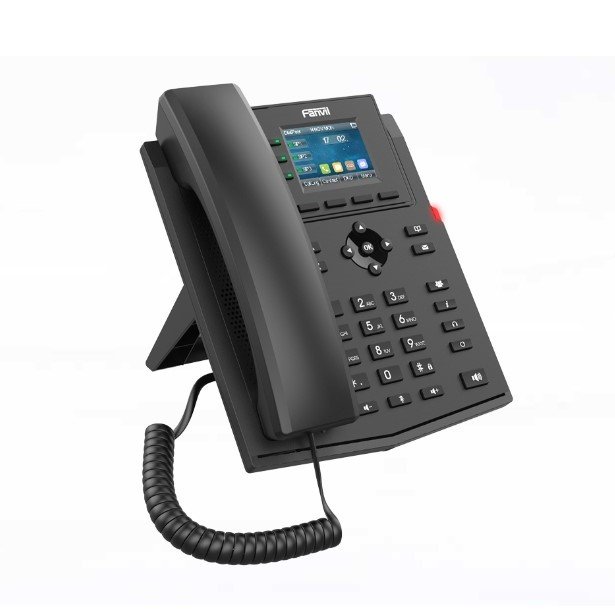
Fanvil X303P Enterprise IP Phone
The Fanvil X303P IP Phone is designed to cater to the communication needs of businesses, whether small, medium, or large. This phone is not just another device; it’s a powerful tool that brings together advanced features, ease of use, and exceptional value.
KSh 6,000.00
Compare-
Fanvil IP Phones
Fanvil X303P Enterprise IP Phone
The Fanvil X303P IP Phone is designed to cater to the communication needs of businesses, whether small, medium, or large. This phone is not just another device; it’s a powerful tool that brings together advanced features, ease of use, and exceptional value.
SKU: n/a

Boost Your Business Communication with Fanvil X303P IP Phone: A Comprehensive Guide
In today’s fast-paced business environment, effective communication is paramount. The Fanvil X303P IP Phone emerges as a standout solution, offering cutting-edge technology that enhances your business’s communication infrastructure. At Imari Technologies, we understand the importance of reliable communication tools, and the Fanvil X303P IP Phone is one of the best choices for businesses aiming to streamline their communication systems.
Introduction to Fanvil X303P IP Phone
The Fanvil X303P IP Phone is designed to cater to the communication needs of businesses, whether small, medium, or large. This phone is not just another device; it’s a powerful tool that brings together advanced features, ease of use, and exceptional value. It is perfect for companies looking to upgrade their office telephony without breaking the bank.
Key Features of Fanvil X303P IP Phone
1. High-Definition Voice Quality
The Fanvil X303P IP Phone boasts superior voice quality, ensuring crystal-clear communication. This is made possible by its wideband codec G.722 and Opus, which deliver exceptional sound quality even in challenging network conditions. Whether you’re in a busy office or a quiet meeting room, the X303P ensures that every word is heard clearly, reducing misunderstandings and improving overall communication efficiency.
2. Multiple SIP Accounts
Managing multiple communication channels is made easy with the Fanvil X303P. It supports up to four SIP accounts, allowing businesses to handle various lines efficiently. This feature is particularly beneficial for customer service teams and departments that require multiple lines for different functions.
3. 2.4-Inch Color Screen
The Fanvil X303P IP Phone features a 2.4-inch color screen, providing a user-friendly interface that makes navigation straightforward. The vibrant display enhances the user experience, making it easy to access different features and functions of the phone. This intuitive design reduces the learning curve, ensuring that employees can start using the phone with minimal training.
4. Advanced Call Management Features
The X303P is equipped with advanced call management features that are essential for any business environment. These include call hold, call transfer, call forwarding, 3-way conferencing, and more. These features empower businesses to manage calls more effectively, improving customer service and internal communication.
5. Power Over Ethernet (PoE)
The Fanvil X303P IP Phone supports Power over Ethernet (PoE), which simplifies installation by eliminating the need for separate power cables. This feature not only reduces cable clutter but also ensures that the phone continues to function during power outages, provided the network equipment is on a UPS.
6. Security Features
Security is a top priority for any business, and the Fanvil IP Phone does not disappoint. It supports a range of security protocols, including TLS, SRTP, and HTTPS, ensuring that all communications are secure and protected from potential threats. This is particularly important in industries where sensitive information is regularly exchanged over the phone.
7. Broad Compatibility
The X303P IP Phone is compatible with a wide range of IP PBX systems and leading VoIP platforms, including Asterisk, Broadsoft, 3CX, and more. This broad compatibility makes it an ideal choice for businesses looking to integrate the phone into their existing communication infrastructure without any compatibility issues.
Benefits of Using Fanvil X303P IP Phone in Your Business
1. Enhanced Productivity
With features like multiple SIP accounts, call management tools, and a user-friendly interface, the Fanvil X303P IP Phone enables employees to handle calls more efficiently. This leads to improved productivity as less time is spent on managing calls and more on core business tasks.
2. Cost-Effective Solution
The Fanvil X303P offers a host of advanced features at a competitive price point. Its support for PoE also reduces the need for additional power supplies, further cutting down on costs. For businesses looking to upgrade their communication systems without incurring high expenses, the X303P is an excellent choice.
3. Improved Customer Service
With the X303P’s advanced call management features, customer service teams can handle calls more effectively, leading to faster response times and better customer satisfaction. The ability to manage multiple lines also means that customers experience less wait time, enhancing their overall experience with your business.
4. Scalability
As your business grows, so do your communication needs. The X303P IP Phone is designed to scale with your business. Its compatibility with various IP PBX systems and VoIP platforms means that it can be easily integrated into your expanding communication network, providing a future-proof solution.
5. Secure Communication
In an age where data breaches are increasingly common, secure communication is non-negotiable. The X303P’s robust security features ensure that all calls are encrypted and secure, giving businesses peace of mind that their communication channels are protected from potential threats.
How to Set Up Fanvil X303P IP Phone
Setting up the Fanvil X303P IP Phone is a straightforward process that can be completed in a few simple steps:
1. Unbox the Phone
Begin by unboxing the Fanvil X303P and ensure all components, including the handset, base, Ethernet cable, and power adapter (if not using PoE), are present.
2. Connect the Handset
Attach the handset to the base of the phone using the provided cable.
3. Network Connection
If your office network supports PoE, connect the Ethernet cable to the PoE switch. The phone will power on automatically. If not using PoE, connect the Ethernet cable to the phone and the network, and plug in the power adapter.
4. Configure SIP Account
Access the phone’s web interface by entering its IP address in a web browser. Log in using the default credentials and configure the SIP accounts with the necessary details provided by your VoIP provider.
5. Test the Phone
Once the configuration is complete, make a test call to ensure that everything is working correctly. Adjust any settings as needed to optimize performance.
Conclusion
The Fanvil X303P IP Phone is a powerful communication tool that offers a range of features designed to enhance productivity, improve customer service, and secure your business communications. Whether you’re a small business or a large enterprise, the X303P is a cost-effective solution that will meet your communication needs.
Technical Specifications
Apple
Item Height18 Millimeters512 GBHard Disk TechnologySolid State DriveGraphics Coprocessor
| Brand | |||||||||||
| Item Width | 31.4 Centimeters | ||||||||||
| Screen Size | 13 Inches | Item Weight | 1.6 Kg | Product Dimensions | 21.9 x 31.4 x 1.8 cm | Item model number | MF841HN/A | Processor Brand | Intel | Processor Type | Core i5 |
| Processor Speed | 2.9 GHz | ||||||||||
| RAM Size | 8 GB | ||||||||||
| Hard Drive Size | |||||||||||
| Intel Integrated Graphics | |||||||||||
| Graphics Card Description | Integrated Graphics Card | ||||||||||
| Hardware Platform | Mac | ||||||||||
| Operating System | Mac OS | ||||||||||
| Average Battery Life (in hours) | 9 |
Based on 3 reviews
Add a review
Related products
-
Fanvil IP Phones
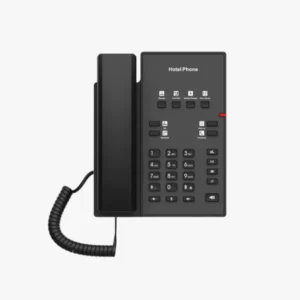
Fanvil H1 Hotel IP Phone
The Fanvil H1 Hotel IP Phone is a specialized communication device tailored specifically for the hospitality industry. It combines advanced technology with user-friendly features to provide an optimal solution for hotels and other accommodation providers.
SKU: n/a -


Anna Kowalsky –
Fusce vitae nibh mi. Integer posuere, libero et ullamcorper facilisis, enim eros tincidunt orci, eget vestibulum sapien nisi ut leo. Cras finibus vel est ut mollis. Donec luctus condimentum ante et euismod.
Anna Kowalsky –
John Doe –
Pellentesque habitant morbi tristique senectus et netus et malesuada fames ac turpis egestas. Suspendisse eget facilisis odio. Duis sodales augue eu tincidunt faucibus. Etiam justo ligula, placerat ac augue id, volutpat porta dui.
John Doe –
Peter Wargner –
Sed id tincidunt sapien. Pellentesque cursus accumsan tellus, nec ultricies nulla sollicitudin eget. Donec feugiat orci vestibulum porttitor sagittis.
Peter Wargner –