

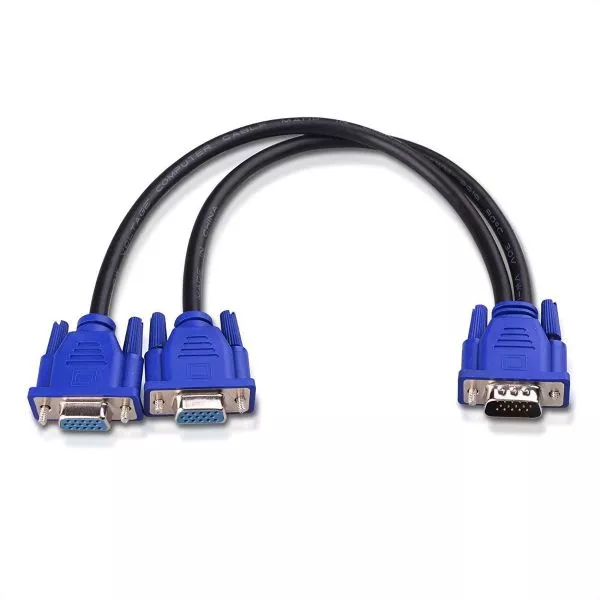
VGA Y Cable Splitter (VGA Splitter)
VGA Y Cable Splitter (VGA Splitter)
KSH 500 EXCL OF VAT
Features
-
Dual Output: Splits one VGA signal into two outputs, enabling simultaneous display on two monitors or projectors.
-
High-Quality Video Transmission: Supports resolutions up to 1920×1080, ensuring clear and sharp images without loss of quality.
-
Plug-and-Play: No drivers or external power required, making it easy to set up and use instantly.
-
Durable Construction: Built with high-quality materials for long-lasting performance and reliable signal transfer.
Compatibility
The VGA Y Cable Splitter works with a wide range of laptops, desktops, and projectors that have VGA output ports. It is compatible with major laptop brands like HP, Dell, Lenovo, and Acer. Ideal for business laptops and desktop computers requiring extended or mirrored displays.
Specifications
-
Connector Type: One male VGA to two female VGA connectors
-
Cable Length: Typically 30cm to 50cm (varies by model)
-
Supported Resolution: Up to 1920×1080 (Full HD)
-
Part Numbers: Compatible with laptops using VGA ports, e.g., HP PN 45678, Dell PN 12345
KSh 500.00
CompareVGA Y Cable Splitter (VGA Splitter)
A VGA Y Cable Splitter splits a single VGA signal from a computer or other VGA-enabled device into two separate outputs. This allows you to send the same video signal to two monitors or projectors simultaneously. It typically has one male VGA connector at the input end and two female VGA connectors at the output ends.
Key Features of a VGA Y Cable Splitter:
- Connector Type:
- One Male VGA Connector: The input side of the splitter has a male VGA connector that plugs into the computer, laptop, or device that outputs the VGA signal.
- Two Female VGA Connectors: The output side has two female VGA connectors, allowing you to connect two monitors or projectors.
- Signal Distribution:
- The VGA Y splitter divides the analog VGA signal into two outputs, letting two different screens display the same image.
- Note: While the splitter duplicates the signal, the image quality may degrade slightly, especially over long distances or at higher resolutions.
- Compatibility:
- Works with any device that has a VGA output, including desktops, laptops, projectors, and older monitors.
- Compatible with VGA monitors, projectors, or other display devices that accept a VGA input.
- Resolutions Supported:
- The VGA Y splitter can generally handle resolutions up to 1920×1080 (Full HD), though the quality of the video signal may degrade with distance or with higher resolution displays.
- Plug-and-Play:
- Typically requires no additional software or drivers to function. Simply plug the male end into the source device and connect the two monitors or projectors to the female connectors.
Common Uses of a VGA Y Cable Splitter:
- Dual Monitor Setup:
- Users commonly use a VGA Y splitter to create a dual-monitor setup, allowing a single computer to display the same content on two screens. This setup often supports presentations, public displays, or multitasking.
- Projector or Display Expansion:
- In classrooms or conferences, users use a VGA Y cable to connect a laptop or PC to multiple projectors or displays, ensuring a larger audience sees the same video output.
- Display Mirroring:
- The splitter allows users to mirror the same content on two different screens, which is useful for public displays, exhibitions, or meeting rooms.
Based on 0 reviews
Be the first to review “VGA Y Cable Splitter (VGA Splitter)”
Related products
-
Uncategorized
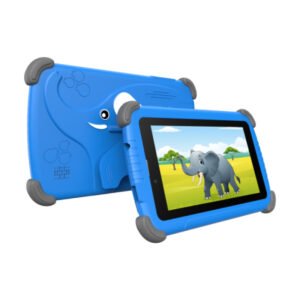
Modio 793 kids tablet 6gb ram/256gb storage,screen;7inches
Modio M793 Kids Tablet.
ON OFFER!!!
From ksh7500 to Kes 6500 Excl vat
Key Features of Modio M793 Kids Tablet
- RAM: 6GB
- Internal Storage: 256GB
- Display: 7 inches, 1024 x 600 px
- Main Camera: 2MP
- Selfie Camera: 3MP
- Battery: 3,000mAh
- Connectivity: Bluetooth, Wi-Fi, Dual SIM
- Processor: Quad Core, 1.5 GHz Processor
- OS: Android v12.
SKU: n/a -
Uncategorized
HP HS04 Laptop Battery (Original)
HP HS04 Laptop Battery (Original)
KSH 5500 EXCL OF VAT
Features
-
Battery Type: Lithium-ion
-
Voltage: 14.6V
-
Capacity: 41Wh / 2600mAh
-
Cell Count: 4-cell
-
Protection: Safeguards against overcharging, overheating, and short circuits
-
Design: Lightweight, durable, and easy to install
-
Performance: Stable power delivery with a long cycle life
This battery offers a simple and effective way to extend your laptop’s lifespan without compromising performance or safety.
Compatible Laptop Models
-
HP 240 G4, G5
-
HP 245 G4, G5
-
HP 250 G4, G5
-
HP 255 G4, G5
-
HP Pavilion 14-ac, 15-ac, 15-af, 15-ay series
-
HP Notebook 15-ba, 15-be, 15-bg series
Compatible Part Numbers
-
HS04
-
HS03
-
HSTNN-LB6U
-
HSTNN-LB6V
-
TPN-C125
-
TPN-C126
-
807956-001
-
807957-001
Power That Keeps Up With You
The HP HS04 Laptop Battery (Original) is built for users who need dependable performance and consistent power. Ideal for students, professionals, and everyday users, it helps keep your workflow uninterrupted and your device mobile.
Swap out your old battery and experience renewed energy and confidence in your HP laptop.
SKU: n/a -
-
Uncategorized
RG59 with power coaxial cable 100 meters
RG59 WITH POWER COAXIAL CABLE.
KES 2800 EXCL VAT
Features:
- 100m RG59 Coaxial Cable – 75 Ohm
- Commonly used for connecting CCTV cameras to a DVR
- To use this cable, you will also require BNC connectors, we sell ‘screw on’ and ‘crimp’ type connectors in our shop.
- Outer Diameter – Coaxial 6mm
- Color: Black
SKU: n/a


There are no reviews yet.